A Notion Mail alternative for Mac: MarginMail
Short answer: Notion Mail closed on September 22, 2026, across web, Mac and iOS; your mail stayed in Gmail. If you want a Mac app for that same Gmail, MarginMail is a native macOS mail app with a calendar built in, a page for every person you write to, and optional AI that runs on your Mac or through your own Claude. It’s free during the beta.
Last checked: October 16, 2026.
What happened to Notion Mail
- Announced June 25, 2026. Closed September 22, 2026, on web, desktop and iOS. It launched in April 2025.
- Why: Notion said more than half its users handled email without opening the inbox, and that it was going “all in” on agents to run the inbox.
- Your mail is safe. It always lived in Gmail. What lived only in Notion Mail (drafts, scheduled sends, snippets, auto-label instructions, custom views) had to be exported by September 21.
- Notion’s suggestion: Notion Custom Agents connected to Gmail or Outlook. Those work inside Notion; there’s no mail inbox to read in.
If you still want an inbox (a calm one), that’s the gap MarginMail fills.
Notion Mail and MarginMail at a glance
| MarginMail | Notion Mail (at closing, Sept 2026) | |
|---|---|---|
| Status | In beta, free during the beta | Closed Sept 22, 2026 |
| Platforms | Native Mac app (macOS 26+); iPhone companion later | Was web, Mac and iOS |
| Accounts | Gmail and Google Workspace, several accounts in one unified inbox | Was Gmail (Outlook not supported) |
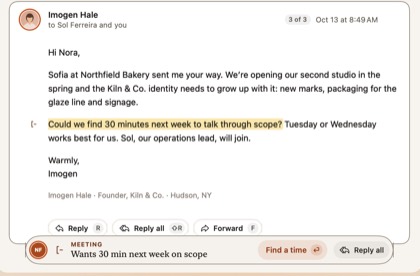
| Sorting | Margin notes for Follow-ups, Meetings and Requests; the Margins stack (Done / Later); “Why this?” on every card | AI auto-labels and custom views |
| Calendar | Built in: unanswered invites marked, accept with A / M / D, find a time with holds | Separate (Notion Calendar) |
| People | A page for everyone you write to; companies by domain | Not built in |
| Writing help | Live words (rules); Write it with your own Claude, on click | Notion AI drafting |
| Where AI runs | Apple Intelligence on your Mac; your own Claude plan only if you opt in, on click (that conversation goes to Anthropic under your account). No MarginMail server. | Notion’s cloud |
| AI sends mail by itself | Never | No (drafts) |
| Works with AI off | Yes, fully | AI was central |
| MarginMail/Notion servers hold your mail | No MarginMail server; Mac ↔ Google only | Processed in Notion’s service |
| Analytics in the app | None | Standard product analytics |
Who should choose which
- Choose Notion Custom Agents if you liked Notion Mail mostly because you never opened it, and you want an agent to label, archive and draft for you inside your Notion workspace.
- Choose MarginMail if you want a real inbox again: one that shows only what needs you, puts your calendar and people beside it, and keeps your mail between you and Google.
- Neither if you need Outlook or Windows today.
Moving from Notion Mail to MarginMail
- Your Gmail is already intact; there’s nothing to import.
- Join the beta and sign in with Google. Add every Google account you use; they share one inbox.
- Notion Mail’s auto-labels don’t carry over. MarginMail doesn’t need labels to sort: its notes find what needs you, and the rest can be marked Done.
- Recreate snippets as MarginMail templates (type
;in the composer).
FAQ
When did Notion Mail shut down?
September 22, 2026, on web, Mac and iOS. Notion announced it on June 25, 2026.
Did I lose my email when Notion Mail closed?
No. Notion Mail was a client for Gmail, so your messages stayed in Gmail. Only data stored inside Notion Mail itself, like drafts, snippets and custom views, had to be exported.
What’s the best Notion Mail alternative for Mac?
If you want a native Mac app for Gmail with a calendar and people built in, MarginMail is made for that. If you want an agent to work your inbox without an inbox app, Notion’s own Custom Agents are the path Notion recommends.
Does MarginMail use AI like Notion Mail did?
Yes, but differently. MarginMail works fully with AI off. When you turn AI on, Request notes use Apple Intelligence on your Mac, and Write it uses your own Claude, only when you click (that conversation goes to Anthropic, under your plan). There’s no MarginMail server, and AI never sends.
Does MarginMail work with Notion?
Not directly today. MarginMail focuses on mail, calendar and people on your Mac.
How much does MarginMail cost?
MarginMail is free during the beta. Pricing will be shared before the beta ends.
Sources
- 9to5Mac, “Notion shutting down its AI-powered email client, including Mac and iOS apps,” June 25, 2026: 9to5mac.com/2026/06/25/notion-shutting-down-its-ai-powere… (read Oct 16, 2026)
- Toolradar, “Notion Mail is shutting down: alternatives,” updated Oct 16, 2026: toolradar.com/blog/notion-mail-shutting-down-alternatives
- Crypto Briefing on the shutdown and Skiff history, June 25, 2026: cryptobriefing.com/notion-mail-shutdown-ai-agents/
- Notion’s help page about the shutdown now redirects to the help-centre home (checked Oct 16, 2026).
Want an inbox again?
Join the MarginMail beta.
You’re on the list.
We’ll email you when your invite is ready. Until then, that’s the only email you’ll get from us.
You’re already on the list.
Good news: nothing else to do. We’ll email you when your invite is ready.
That didn’t go through.
Check your email address and try again. If it keeps happening, write to hello@marginmail.ai.