MarginMail vs Gmail on the web: a native Gmail app for Mac
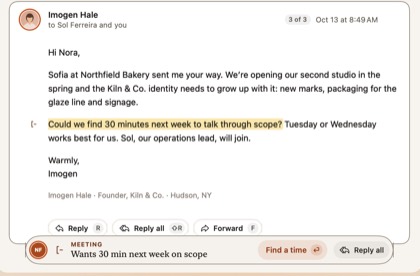
Short answer: Google doesn’t make a Gmail app for the Mac; Gmail runs in a browser tab, with free Gemini basics and more AI on Google AI Plus ($9.99/mo) and Pro ($19.99/mo). MarginMail is a native Mac app for the same Gmail and Google Workspace accounts. It keeps your calendar and people in one window, notes what needs you, and runs optional AI on your Mac. MarginMail is free during its beta.
Last checked: October 16, 2026. Prices in USD.
At a glance
| MarginMail | Gmail on the web + Gemini | |
|---|---|---|
| Price | Free during the beta | Free; Gemini extras with Google AI Plus $9.99/mo, AI Pro $19.99/mo; Workspace from $7/user/mo |
| Mac app | Native (SwiftUI), macOS 26+ | None; browser tab |
| Accounts | Gmail and Google Workspace, several in one unified inbox | One account per tab or account switcher |
| What needs you | Margin notes (Follow-ups, Meetings, Requests); the Margins stack with “Why this?” | Category tabs; AI Inbox with suggested to-dos (paid plans) |
| Calendar | Built in: unanswered invites marked, A / M / D, Needs your answer list, find a time with holds | Calendar side panel; “Help me schedule” for one-on-one meetings |
| People | A page per person (conversations, meetings, tasks, local time); companies by domain | Google Contacts |
| AI drafting | Write it: from your notes, on click, with your own Claude; flags anything new | Help Me Write and Suggested Replies (free) |
| Ask your inbox | What’s been decided on long threads | AI Overviews in search, Gemini side panel (paid plans) |
| Where AI runs | Apple Intelligence on your Mac; your own Claude plan only if you opt in, on click (that conversation goes to Anthropic under your account). No MarginMail server. | Google’s cloud |
| Works with AI off | Yes, fully | Yes; smart features can be turned off |
| Live words in compose | Yes: dates, people, files, promises | No |
| Done, not Archive | Yes | Archive |
Where Gmail on the web is the better choice
- You want free, forever, in any browser on any computer.
- You want Gemini answers across Gmail, Drive and Docs.
- You’re on a Chromebook, Windows or Linux machine.
- You rely on Gmail’s search operators and web-only features every day (MarginMail passes Gmail search operators through too).
- You want to drop a booking page into a message.
- You set your out-of-office reply often (MarginMail doesn’t edit it yet).
Where MarginMail is the better choice
- You want a real Mac app: native windows, keyboard shortcuts, Dock badge, notifications, no tab to lose.
- You have several Google accounts and want them in one inbox.
- You want notes about what needs you and people pages, built from mail and calendar you already have.
- You want AI that starts on your Mac and uses your own Claude plan only when you click, not another cloud.
Who should choose which
Gmail on the web if a browser tab suits you and Gemini is part of your Google plan. MarginMail if you spend your day in Gmail on a Mac and want it calmer, with your calendar and people beside it.
FAQ
Is there an official Gmail app for Mac?
No. Google offers Gmail on the web and on iPhone and Android, but not a Mac app. MarginMail is a native Mac app for Gmail and Google Workspace.
Is Gemini in Gmail free?
Help Me Write, thread summaries and Suggested Replies became free for all users in January 2026. AI Overviews in search, AI Inbox and the Gemini side panel need a Google AI or eligible Workspace plan.
Does MarginMail change anything in my Gmail account?
MarginMail uses the Gmail API from your Mac. What you do in MarginMail (Done, labels, replies) shows up in Gmail as usual. MarginMail keeps its own small state in your Google Drive’s hidden app folder, not on a MarginMail server.
Can I use several Gmail accounts in MarginMail?
Yes. Add several Gmail and Workspace accounts; they share one unified inbox.
Does Google see what MarginMail does?
Your mail stays with Google as it always has. MarginMail adds no server of its own. Its optional AI uses Apple Intelligence on your Mac, or your own Claude when you click.
How much does MarginMail cost?
MarginMail is free during the beta. Pricing will be shared before the beta ends.
Sources
- TechCrunch, “Gmail debuts a personalized AI Inbox…”, Jan 8, 2026: techcrunch.com/2026/01/08/gmail-debuts-a-personalized-ai-…
- Google One AI plans: one.google.com/about/plans (read Oct 16, 2026)
- Google Workspace pricing: workspace.google.com/pricing (read Oct 16, 2026)
- Gemini in Gmail help: support.google.com/mail/answer/14199860 (read Oct 16, 2026)
- 9to5Google, AI Inbox for AI Plus and Pro (I/O), May 19, 2026: 9to5google.com/2026/05/19/gmail-live
- 9to5Google, “Help me schedule”, Oct 14, 2025: 9to5google.com/2025/10/14/gmail-calendar-gemini-schedule/
Your Gmail, finally at home on the Mac.
Join the MarginMail beta.
You’re on the list.
We’ll email you when your invite is ready. Until then, that’s the only email you’ll get from us.
You’re already on the list.
Good news: nothing else to do. We’ll email you when your invite is ready.
That didn’t go through.
Check your email address and try again. If it keeps happening, write to hello@marginmail.ai.