MarginMail vs Spark: a private Spark alternative for Mac
Short answer: Spark is a popular, cross-platform mail app with a free plan, support for almost every provider, and AI that runs on device or with cloud providers. MarginMail is a native Mac app for Gmail and Google Workspace with no MarginMail server in the path, a calendar and people pages in the same window, and optional AI on your Mac or through your own Claude. If you need Windows, Android or iCloud today, choose Spark. If you want calm and privacy on a Mac, try MarginMail.
Last checked: October 16, 2026. Prices in USD.
At a glance
| MarginMail | Spark | |
|---|---|---|
| Price | Free during the beta | Free; Plus $10/mo ($99/yr); Pro $20/mo ($199/yr); Enterprise on request |
| Platforms | Native Mac (macOS 26+); iPhone companion later | Mac, Windows, iPhone, iPad, Apple Watch, Android |
| Accounts | Gmail and Google Workspace, several in one unified inbox | Gmail, iCloud, Yahoo, Exchange/M365, Outlook, any IMAP |
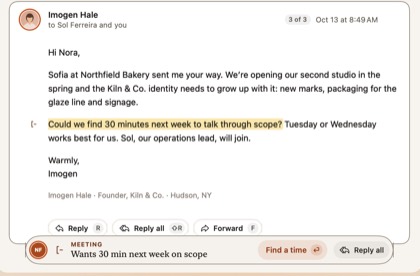
| What needs you | Margin notes (Follow-ups, Meetings, Requests); the Margins stack with “Why this?” | Smart Inbox (priority vs. the rest), bundles, Gatekeeper for new senders |
| Calendar | Built in: unanswered invites marked, A / M / D, Needs your answer list, find a time with holds | Built in, with Meeting Notes |
| People | A page per person (conversations, meetings, tasks, local time); companies by domain | Priority Sender; no people pages |
| AI | Optional. Apple Intelligence on your Mac (Requests); your own Claude on click (Write it, What’s been decided) | Spark +AI (write, summarize), AI Assistant over your mail, Meeting Notes; Auto-Drafts in closed beta (Pro) |
| Where AI runs | Apple Intelligence on your Mac; your own Claude plan only if you opt in, on click (that conversation goes to Anthropic under your account). No MarginMail server. | On-device models and/or Azure OpenAI, OpenAI, Anthropic and Google Vertex AI, per Spark’s privacy policy |
| Agents | No outside agent access; AI never sends | Spark CLI for Claude Code and Codex; “Send” permission lets an agent send without per-message approval (Pro) |
| Vendor servers | No MarginMail server; Mac ↔ Google only | Spark’s servers handle shared mail, Send Later and push; recent mail kept up to 4 hours; login stored as a token |
| Send later with the laptop closed | Needs a Mac awake | Yes (server-side) |
| Teams | Not a team product | Shared inbox, shared drafts, assignments, comments |
| Analytics in the app | None | See Spark’s privacy policy |
Where Spark is the better choice
- You use iCloud, Outlook, Yahoo or IMAP accounts. MarginMail is Google-only today.
- You need Windows, Android or a mature iPhone app.
- You want a free plan that will stay free.
- You want Send Later and push that work with your laptop closed.
- Your team shares an inbox or drafts.
- You rely on Smart Folders or saved searches.
Where MarginMail is the better choice
- You’d rather no vendor server sat between you and Google.
- You want a short stack of what needs you, each card with a “Why this?”, instead of a priority list.
- You want people pages built from your mail and meetings, with their local time.
- You want live words: type “Tuesday with Ava” and both calendars’ free times appear.
- You want AI that never sends, and that you can turn off without losing anything.
Who should choose which
Spark for people who need every platform and provider, a free plan, or team features. MarginMail for Mac users on Gmail or Workspace who want their mail, calendar and people in one calm window, and want to keep their mail between themselves and Google.
Switching from Spark
- Your mail stays in Gmail; nothing to import.
- Spark’s Gatekeeper → MarginMail’s New faces for first-time senders.
- Spark’s “Done” → MarginMail’s Done (same idea: handled mail leaves).
- Templates: recreate them in MarginMail and use
;in the composer. - You can run both side by side while you try MarginMail.
FAQ
Is Spark private?
Spark’s privacy policy (Sept 10, 2026) says content is mostly processed on your device, while its servers handle shared mail, Send Later and recent mail for up to 4 hours, and AI can use cloud providers including OpenAI, Anthropic and Google. MarginMail has no server for your mail at all: it talks to Google directly from your Mac.
What’s the best Spark alternative for Mac?
If you’re on Gmail or Google Workspace and want privacy plus a calendar and people in one window, MarginMail is built for that. If you need iCloud or Outlook accounts, Spark is still the more complete choice today.
Does MarginMail have a free plan like Spark?
MarginMail is free during the beta. Pricing will be shared before the beta ends.
Does MarginMail have Spark’s Gatekeeper?
Yes, in its own form: first-time senders go to New faces, where you choose Welcome or Not for me once for all their mail.
Can Spark’s AI send email on its own?
Spark’s Auto-Drafts never send automatically. But Spark CLI’s Send permission, added in July 2026, lets an outside agent send without approving each message. MarginMail’s AI can never send.
Does MarginMail work on Windows or iPhone?
MarginMail is a Mac app. An iPhone companion comes later. There are no plans for Windows.
Sources
- Spark pricing: sparkmailapp.com/pricing (read Oct 16, 2026)
- Spark features: sparkmailapp.com/features (read Oct 16, 2026)
- Spark privacy policy (dated Sept 10, 2026): sparkmailapp.com/privacy
- “Spark agents that follow through” (Send permission), Jul 24, 2026: sparkmailapp.com/blog/spark-agents-that-follow-through
- Spark Auto-Drafts help: sparkmailapp.com/help/spark-ai/auto-drafts-in-spark
- Supported providers: sparkmailapp.com/help/add-manage-accounts/connect-to-your…
Calm mail, nobody in the middle.
Join the MarginMail beta.
You’re on the list.
We’ll email you when your invite is ready. Until then, that’s the only email you’ll get from us.
You’re already on the list.
Good news: nothing else to do. We’ll email you when your invite is ready.
That didn’t go through.
Check your email address and try again. If it keeps happening, write to hello@marginmail.ai.