Email follow-up reminders on Mac: see who hasn’t replied
Short answer: Gmail doesn’t keep a list of sent emails nobody answered. Its Nudges feature brings some back automatically, and browser extensions add “remind me if no reply” to Gmail in Chrome. On a Mac, MarginMail, a native email app for Gmail, notices when you’re waiting on someone and writes a note like “You asked Ava on Oct 9. No reply in 6 days,” with no AI needed.
Last checked October 16, 2026.
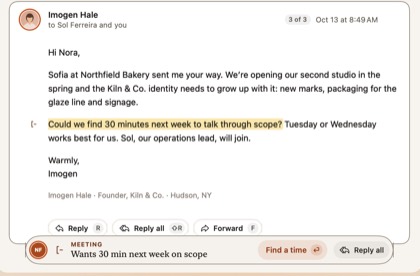
Three ways to track follow-ups
| Approach | How it works | Good for | Watch out for |
|---|---|---|---|
| Gmail Nudges | Gmail can suggest older emails to follow up on or reply to, at the top of your inbox (Settings › General › Nudges) | Free, nothing to install | Gmail chooses which emails come back; there’s no full “waiting on” list |
| A browser extension (for example, Boomerang for Gmail) | Adds “remind me if no reply in N days” to Gmail in your browser | Precise reminders on chosen emails | Works in the browser only; the extension’s service handles your mail |
| A mail app that tracks it for you (MarginMail on Mac) | Notices who you’re waiting on and brings it back as a note and a card | No setup per email; also works for what others asked you | MarginMail needs your Mac running to fire reminders on time |
How follow-ups work in MarginMail
- Write and send as usual. MarginMail keeps track of threads where you asked something and the other person hasn’t answered.
- A note appears when it’s late. The reply bar shows a Follow-up note in one line: “You asked Ava on Oct 9. No reply in 6 days.” Hover for the why and the source message.
- Work it from the stack. Follow-ups join the Margins stack beside your calendar. Reply to nudge, drag right for Done, or left to come back to it.
- Set a specific reminder when you want one. From the composer or any thread, choose Remind me if no reply in a few days. If no one answers, the thread comes back to the top with “No reply yet.”
- See everyone you’re waiting on. In People, Waiting on them lists who owes you a reply, and Waiting on your reply lists who you owe. Tasks you add can close themselves when the reply or attachment arrives.
What it doesn’t need: AI, an extension, or a server. Follow-ups are rules that run on your Mac. With Apple Intelligence on, MarginMail also finds Requests, the sentences where someone asked you for something, and highlights them word for word.
Calm by default: MarginMail shows a few notes a day (5 by default, adjustable from 3 to 7), only when it’s sure, and respects quiet hours. “Not useful” teaches it to stop.
FAQ
How do I see which of my Gmail emails haven’t been replied to?
Gmail doesn’t keep a full list. Its Nudges setting brings back some older emails automatically. On a Mac, MarginMail tracks it for you: follow-up notes show who hasn’t replied and for how long, and the People view lists everyone you’re waiting on.
Does Gmail have follow-up reminders?
Gmail has Nudges, which can suggest emails to follow up on, but it picks them for you and doesn’t let you set “remind me if no reply” on a specific email. Extensions and some mail apps add that. MarginMail offers both automatic follow-up notes and a per-thread “Remind me if no reply.”
Is there a follow-up reminder app for Mac that isn’t a browser extension?
Yes. MarginMail is a native Mac email app for Gmail and Google Workspace with follow-up notes and “Remind me if no reply” built in. It runs on your Mac with no extension and no MarginMail server.
Do follow-up reminders in MarginMail use AI?
No. Follow-up notes and reminders run on rules on your Mac. AI is optional in MarginMail and adds Request notes, found on-device by Apple Intelligence.
Does MarginMail track whether people opened my email?
No. MarginMail never adds read receipts or tracking pixels. It tracks replies, not opens.
Sources
- Google, “Reply to messages in Gmail” (includes Nudges settings), Gmail Help: support.google.com/mail/answer/6585?hl=en&co=GENIE.Platfo… (found Oct 16, 2026)
- Boomerang for Gmail: boomeranggmail.com (read Oct 16, 2026)
- MarginMail features: marginmail.ai
Know who you're waiting on.
Join the MarginMail beta.
You’re on the list.
We’ll email you when your invite is ready. Until then, that’s the only email you’ll get from us.
You’re already on the list.
Good news: nothing else to do. We’ll email you when your invite is ready.
That didn’t go through.
Check your email address and try again. If it keeps happening, write to hello@marginmail.ai.