The best Gmail apps for Mac in 2026
Short answer: Google doesn’t make a Gmail app for the Mac, so you choose between native clients and the browser. For a pure native Gmail client, Mimestream. For free and simple, Apple Mail. For every platform and provider, Spark. For the most AI, Superhuman or Shortwave. For mail, calendar and people in one private Mac window, MarginMail (our app, in beta).
Last checked October 16, 2026. Prices in USD. Disclosure: we make MarginMail. It’s included, labeled, and held to the same questions as the others.
How we judged
Five questions that matter for Gmail on a Mac:
- Native? A real Mac app, or a web view or browser tab.
- Gmail-aware? Built on the Gmail API (labels, threads, aliases) or generic IMAP.
- Calendar? In the same window, or somewhere else.
- Where does AI run? Vendor cloud, Google’s cloud, on-device, your own model, or none.
- Price for one person.
At a glance
| App | Best for | Price (Oct 2026) | Gmail approach | Calendar | AI and where it runs |
|---|---|---|---|---|---|
| MarginMail (ours, beta) | Mail, calendar and people in one private window | Free during the beta | Native SwiftUI on the Gmail API; several Google accounts in one inbox | Built in: A / M / D answers, find a time with holds | Optional: Apple Intelligence on your Mac; your own Claude on click; never sends |
| Mimestream | A pure, polished native Gmail client | $49.99/yr or $4.99/mo | Native, Gmail API, no sync server | Invite banner with availability; no calendar view | None |
| Apple Mail | Free and simple, any provider | Free | Native, IMAP | Separate Calendar app | Apple Intelligence: summaries, Smart Replies in your style; on-device and Private Cloud Compute |
| Spark | Every platform and provider, a free plan, teams | Free; Plus $10/mo; Pro $20/mo | Cross-platform app; Gmail and most providers | Built in | +AI writing and assistant; on-device and/or cloud providers; Auto-Drafts beta |
| Superhuman Mail | Speed and the most AI help | From $25/mo yearly ($30 monthly) | Mac, Windows, web, mobile; Gmail and Microsoft 365 | Built in | Auto Drafts, Ask AI, Mail MCP; Superhuman’s cloud |
| Shortwave | The most capable AI agent for Gmail | From $30/seat/mo | Mac, Windows, web, mobile; Gmail only | Built in (Google Calendar) | AI agent with Claude models; Shortwave’s cloud |
| Canary Mail | Every provider, encryption, low price | Free; $36/yr; $100/yr | Mac, Windows, mobile; most providers | Built in (view, accept, suggest times) | Prioritization on-device; writing with hosted models |
| Outlook for Mac | Microsoft 365 workplaces that also have Gmail | Free app; Copilot with M365 from $9.99/mo | Native; adds Google accounts | Built in | Copilot in Microsoft’s cloud |
| Gmail in the browser | Free, anywhere, with Gemini | Free; Google AI Plus $9.99/mo, Pro $19.99/mo | Browser tab | Side panel; Help me schedule | Gemini in Google’s cloud |
The apps
MarginMail: best for mail, calendar and people in one private window (ours)
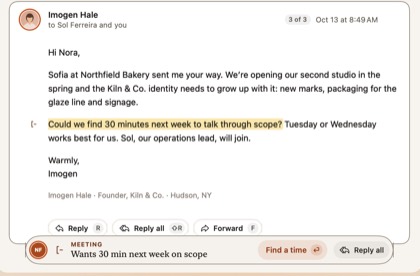
A native Mac email app for Gmail and Google Workspace. It writes short notes about what needs you (follow-ups, meeting invites, requests), turns them into a stack you swipe through beside your calendar, and gives everyone you write to a page. Live words turn “Tuesday with Ava” into both calendars’ free times. There’s no MarginMail server and no analytics; AI is optional, on your Mac or your own Claude, and never sends.
Choose it if you live in Gmail on a Mac and want your day in one window. Skip it if you need iCloud or Microsoft accounts, Windows, or an iPhone app today. macOS 26+.
Mimestream: best pure native Gmail client
Fast, focused and faithful to Gmail’s labels, filters and categories, talking straight to the Gmail API with data only on your device. No calendar view and no AI. iPhone app in a limited TestFlight beta.
Choose it if you want Gmail, natively, and nothing else.
Apple Mail: best free option
Built into every Mac, works with nearly any provider, and macOS 27 adds relevance search and Smart Replies in your style. Gmail works over IMAP, so labels behave like folders. Calendar is a separate app.
Choose it if you mix providers and want free and simple.
Spark: best for every platform
Mac, Windows, iPhone, Android; Gmail, iCloud, Outlook and IMAP; Smart Inbox, Gatekeeper and team features. Spark’s servers handle Send Later, push and shared mail, and its AI can use cloud providers.
Choose it if you need cross-platform and a free plan.
Superhuman Mail: best for speed and AI help
Keyboard-first speed with Auto Drafts, Ask AI and a Mail MCP for outside agents. Gmail and Microsoft 365. Cloud-processed, with read statuses.
Choose it if maximum AI help is worth $25–40 a month.
Shortwave: best AI agent for Gmail
An AI agent that searches across many threads, drafts, schedules and organizes, with Claude models by plan. Gmail only; Microsoft 365 isn’t supported.
Choose it if you want AI to do as much of your email as possible.
Canary Mail: best for encryption on a budget
Every provider and platform, PGP and SecureSend on Pro+, low yearly pricing. Prioritization runs on-device; writing uses hosted models. Sends its own read receipts by default on macOS.
Choose it if you need encryption or every provider.
Outlook for Mac: best for Microsoft 365 people
Free, mail and calendar together, adds Google accounts, Copilot with Microsoft 365.
Choose it if your work runs on Microsoft 365.
Gmail in the browser: best free, anywhere
No install, Gemini basics free since January 2026, more with Google AI plans.
Choose it if a tab works for you.
FAQ
Is there an official Gmail app for Mac?
No. Google offers Gmail on the web, iPhone and Android, but not as a Mac app. On a Mac you use a browser or a third-party client such as Mimestream, MarginMail, Apple Mail, Spark, Superhuman, Shortwave, Canary or Outlook, each with different trade-offs in price, privacy and features.
What is the best native Gmail client for Mac?
Mimestream is the most established native Gmail-only client, built on the Gmail API with no sync server. MarginMail is a newer native Gmail app that adds a calendar, people pages and optional on-device AI; it’s in free beta. Apple Mail is native too but uses IMAP.
Which Mac email app has a built-in calendar for Gmail?
MarginMail, Spark, Superhuman, Shortwave, Canary and Outlook all include a calendar. MarginMail keeps it in the same window as your mail, with one-key invite answers and a find-a-time view. Mimestream shows only an availability banner on invites; Apple Mail uses the separate Calendar app.
Which Gmail app for Mac is the most private?
Apps that talk to Gmail directly from your Mac, with no server of their own, are the most private. Mimestream and MarginMail work this way. MarginMail also runs no analytics and keeps its optional AI on your Mac or your own Claude, and it never sends.
Is Apple Mail good for Gmail?
It works, and it’s free. Because it uses IMAP, Gmail labels act like folders and some Gmail features don’t carry over. If you live in Gmail all day, a Gmail API client such as Mimestream or MarginMail fits Gmail more naturally.
Sources
- Mimestream: mimestream.com, mimestream.com/pricing, mimestream.com/ios-beta (read Oct 16, 2026)
- Apple, What’s new in macOS 27: support.apple.com/guide/mac-help/whats-new-in-macos-27-ap…
- Spark: sparkmailapp.com/pricing, sparkmailapp.com/privacy (Sept 10, 2026)
- Superhuman: superhuman.com/plans/mail; monthly prices via getinboxzero.com/superhuman-pricing (checked Sep 28, 2026)
- Shortwave: shortwave.com/pricing, shortwave.com/security
- Canary: canarymail.io/pricing, canarymail.io/privacy
- Microsoft 365 plans: microsoft.com/en-us/microsoft-365/buy/compare-all-microso…
- Google One AI plans: one.google.com/about/plans; TechCrunch on free Gemini in Gmail (Jan 8, 2026): techcrunch.com/2026/01/08/gmail-debuts-a-personalized-ai-…
Try the one we make.
Join the MarginMail beta, free.
You’re on the list.
We’ll email you when your invite is ready. Until then, that’s the only email you’ll get from us.
You’re already on the list.
Good news: nothing else to do. We’ll email you when your invite is ready.
That didn’t go through.
Check your email address and try again. If it keeps happening, write to hello@marginmail.ai.