Private AI email: what stays on your Mac
Short answer: An AI email app is only as private as the place its AI runs. Most AI mail apps send your messages to their own cloud or to a model provider. The most private setup keeps mail between you and your provider, runs AI on your Mac, and only uses a cloud model you chose, when you ask. MarginMail, a native Mac email app for Gmail, is built that way, and its AI never sends.
Last checked October 16, 2026. Sources at the end.
Where your email goes when an app uses AI
There are five common setups. Ask any mail app which one it uses.
| Setup | Where your mail is processed | Examples (Oct 2026) |
|---|---|---|
| Vendor cloud | The app maker’s servers, often with OpenAI or Anthropic models behind them | Superhuman (Superhuman’s cloud, Anthropic and OpenAI models); Shortwave (its cloud on Google Cloud, Claude models by plan); Spark (on-device and/or Azure OpenAI, OpenAI, Anthropic, Google Vertex AI per its policy) |
| Your mail provider’s cloud | Google’s or Microsoft’s own AI | Gmail with Gemini; Outlook with Microsoft 365 Copilot |
| On-device, plus the platform’s private cloud | On your device, with heavier requests in Apple’s Private Cloud Compute | Apple Mail with Apple Intelligence |
| Bring your own model or agent | A model or agent you connect, under your own account | Missive (your own OpenAI, Anthropic or Gemini key); Airmail and HEY (your own agent through MCP or a CLI) |
| No AI | Nowhere | Mimestream |
None of these is wrong. They’re trade-offs between capability, convenience and how many companies handle your mail.
Five questions to ask any AI email app
- Does the app maker run a server that stores or processes my mail? If yes, ask what’s kept and for how long.
- Which AI model reads my mail, and under whose account? Yours, the app maker’s, or your mail provider’s?
- Does AI run when I’m not asking? Background triage means more of your mail is read by a model.
- Can the AI send email, or change things, on its own? Look for “drafts only” and an explicit send step.
- Does the app work with AI off? If not, privacy and usefulness are tied together.
How MarginMail answers them
MarginMail uses three tiers. Each one says what it is when it appears.
| Tier | What it does | Where it runs | What leaves your Mac |
|---|---|---|---|
| 1. Rules | Follow-up and meeting notes, live words (dates, people, files, promises), the calendar, Find a time, People and Companies | Your Mac | Nothing beyond the normal Gmail and Google Calendar requests every mail app makes |
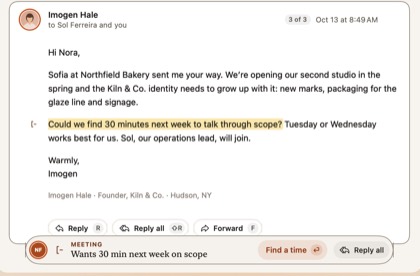
| 2. Apple on-device | Request notes: finds the sentence where someone asked you for something, highlights it word for word, and says what it’s based on | Apple Intelligence on your Mac | Nothing. No account or key is involved |
| 3. Your own Claude (opt in) | Write it drafts a reply from your notes and the thread; What’s been decided summarizes long threads | The Claude Code you installed on your Mac, signed in to your own Claude plan | Only the conversation you clicked on, sent by your Claude to Anthropic under your account’s terms. MarginMail isn’t in that path and never sees your login |
What’s true in every tier:
- No MarginMail server. MarginMail talks to Google directly from your Mac. Its own small settings live in your Google Drive’s hidden app folder.
- No analytics. We can’t see how you use MarginMail.
- AI never sends. Write it fills the composer; you read it and press ⌘⏎. Anything the draft added that the thread didn’t have (a new recipient, a link, a number or a code) is flagged.
- Tier 3 is click-only and read-only. Your Claude runs with MarginMail’s read-only tools; it can’t send, delete, create filters or fetch the web.
- Off means off. Turn AI off in Settings › Intelligence and every rules feature keeps working.
Who should choose what
- Want the most powerful AI and don’t mind a vendor cloud? A vendor-cloud app gives you more automation today.
- Already pay for Gemini or Copilot? Your provider’s AI keeps mail inside the company that already hosts it.
- Want AI with no third party at all? Apple Mail’s on-device features, or MarginMail’s Tier 2, keep it on your device.
- Want strong AI drafting, but under your own account? Bring-your-own-model setups like MarginMail’s Tier 3 or Missive’s API keys.
- Want no AI? Mimestream, or MarginMail with AI off.
FAQ
What is the most private AI email app for Mac?
The most private setup has no app-maker server, runs AI on your Mac, and only uses a cloud model you chose, when you ask. MarginMail is built that way for Gmail: rules and Apple Intelligence on your Mac first, your own Claude only on click, and AI never sends.
Is there an email client that doesn’t store my emails on its servers?
Yes. Some native clients connect directly to your mail provider from your device, with no sync server of their own. For Gmail on the Mac, MarginMail and Mimestream both work this way; MarginMail also runs no analytics and keeps its AI on your Mac or your own Claude.
Does on-device AI mean my email never leaves my Mac?
For the on-device part, yes: the model runs locally and nothing is uploaded. MarginMail’s Request notes use Apple’s on-device model. Apple Mail also uses Private Cloud Compute for some requests. If you opt into a cloud model, like your own Claude, the conversation you send goes to that provider.
Can I use my own Claude with Gmail?
Yes, with MarginMail on a Mac. MarginMail finds the Claude Code you installed and uses it, under your own plan, only when you click Write it or What’s been decided. It never sees your Claude login and doesn’t use an API key.
Can AI email apps send messages without asking?
Some can. Several apps let connected agents send mail, sometimes without approving each message. MarginMail’s AI can only draft; sending is always your keystroke.
Sources
- Superhuman Mail plans and AI: superhuman.com/plans/mail; TechCrunch on Auto Drafts (Jul 14, 2026): techcrunch.com/2026/07/14/superhumans-new-auto-draft-feat…
- Shortwave security and pricing: shortwave.com/security, shortwave.com/pricing (read Oct 16, 2026)
- Spark privacy policy (Sept 10, 2026): sparkmailapp.com/privacy
- Gemini in Gmail: support.google.com/mail/answer/14199860 (read Oct 16, 2026)
- Apple, What’s new in macOS 27: support.apple.com/guide/mac-help/whats-new-in-macos-27-ap…
- Missive AI setup (bring your own key): missiveapp.com/docs/ai/setup
- Airmail MCP (Jun 26, 2026): airmailapp.substack.com/p/airmail-mcp; HEY AI agents help (Sept 22, 2026): help.hey.com/article/1189-using-ai-agents-with-hey
- Mimestream: mimestream.com/faqs (read Oct 16, 2026)
Private AI, on your Mac.
Join the MarginMail beta.
You’re on the list.
We’ll email you when your invite is ready. Until then, that’s the only email you’ll get from us.
You’re already on the list.
Good news: nothing else to do. We’ll email you when your invite is ready.
That didn’t go through.
Check your email address and try again. If it keeps happening, write to hello@marginmail.ai.