MarginMail vs Apple Mail: an Apple Mail alternative for Gmail users
Short answer: Apple Mail is free, built into every Mac, works with nearly every provider, and in macOS 27 adds relevance search and style-matched Smart Replies through Apple Intelligence. MarginMail is a native Mac app made for Gmail and Google Workspace that adds what Mail leaves to other apps: a calendar in the same window, a page for every person, and notes about what needs you. Both keep AI private; MarginMail is free during its beta.
Last checked: October 16, 2026.
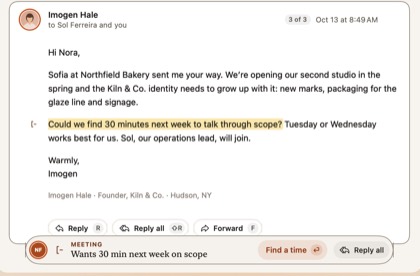
At a glance
| MarginMail | Apple Mail (macOS 27) | |
|---|---|---|
| Price | Free during the beta | Free with macOS |
| Platforms | Native Mac (macOS 26+); iPhone companion later | Mac, iPhone, iPad |
| Accounts | Gmail and Google Workspace, several in one unified inbox | iCloud, Gmail, Exchange/Outlook, Yahoo, any IMAP |
| Gmail specifics | Uses the Gmail API: real threads, labels, Done, aliases, signatures from Gmail | Uses IMAP for Gmail |
| What needs you | Margin notes (Follow-ups, Meetings, Requests); the Margins stack with “Why this?” | Categories, Priority Messages, summaries |
| Calendar | Built in: unanswered invites marked, A / M / D, Needs your answer list, find a time with holds | Separate Calendar app; suggestions can create an event from a message |
| People | A page per person (conversations, meetings, tasks, local time); companies by domain | Contacts app |
| AI | Optional. Apple Intelligence on your Mac (Requests); your own Claude on click (Write it, What’s been decided) | Apple Intelligence: summaries, Smart Replies in your style, Write with Siri, relevance search |
| Where AI runs | Apple Intelligence on your Mac; your own Claude plan only if you opt in, on click (that conversation goes to Anthropic under your account). No MarginMail server. | On device and Apple’s Private Cloud Compute |
| AI sends mail | Never | No |
| Live words in compose | Yes: dates, people, files, promises become actions | No |
| Tracking protection | Remote images blocked by default; no read receipts | Protect Mail Activity (hides IP, preloads remote content privately) |
Where Apple Mail is the better choice
- You use iCloud, Exchange or IMAP accounts. MarginMail is Google-only today.
- You want mail on iPhone and iPad in the same app now.
- You want something free forever and already installed.
- You’re happy with a simple list and a separate Calendar app.
Where MarginMail is the better choice
- You live in Gmail or Google Workspace and want an app built on the Gmail API, not IMAP.
- You want your calendar in the same window, with invites answered by a single key.
- You want a page for every person you write to, with their local time and open tasks.
- You want notes about what needs you, like “You asked Ava on Oct 9. No reply in 6 days.”
- You want AI drafts from your notes (with your own Claude), with anything new flagged, that never send.
Who should choose which
Apple Mail for people with mixed providers who want a free, simple client. MarginMail for Gmail and Workspace users on a Mac whose days are mail, meetings and people, and who want them together, privately.
FAQ
Is there a better Mac mail app than Apple Mail for Gmail?
If you use Gmail or Google Workspace, MarginMail is built on the Gmail API and adds a calendar, people pages and notes about what needs you, while staying private. Apple Mail is better if you also need iCloud or Exchange accounts.
Does Apple Mail have a calendar?
No. Calendar is a separate app on the Mac. MarginMail has a calendar in the same window as your mail.
What AI does Apple Mail have in macOS 27?
Relevance-ranked search, Smart Replies in your style, Write with Siri for drafting, plus categories, Priority Messages and summaries. It runs on device and in Apple’s Private Cloud Compute.
Does MarginMail use Apple Intelligence too?
Yes. MarginMail uses Apple Intelligence on your Mac to find Requests (someone asked you for something). Nothing leaves the Mac. MarginMail also works fully with AI off.
Is MarginMail free like Apple Mail?
MarginMail is free during the beta. Pricing will be shared before the beta ends.
Which macOS do I need?
MarginMail needs macOS 26 or later.
Sources
- Apple, “What’s new in macOS 27”: support.apple.com/guide/mac-help/whats-new-in-macos-27-ap… (read Oct 16, 2026)
- MacRumors, “New features and changes in macOS 27,” Sept 17, 2026: macrumors.com/2026/09/17/new-features-changes-macos-27/
- Apple Mail privacy settings: support.apple.com/guide/mail/change-privacy-preferences-m…
- 9to5Mac on Apple Mail in iOS 27, Oct 9, 2026: 9to5mac.com/2026/10/09/heres-everything-new-for-apple-mai…
Mail, calendar and people in one window.
Join the MarginMail beta.
You’re on the list.
We’ll email you when your invite is ready. Until then, that’s the only email you’ll get from us.
You’re already on the list.
Good news: nothing else to do. We’ll email you when your invite is ready.
That didn’t go through.
Check your email address and try again. If it keeps happening, write to hello@marginmail.ai.